Shape library
Choose Add for basic shapes and architecture objects. Browse cloud & technology icons opens the searchable service catalog before placement.
 flowboard
Use Flowboard in a desktop browser at least 960 CSS pixels wide with a keyboard and pointer, or connect an agent through MCP. Mobile editing is not supported.
Product manual
Start with familiar shapes and connections. Add C4 structure when it helps, share live diagrams, and keep portable sources and named checkpoints.
01 / Quick start
Flowboard is a two-way communication surface for people and AI. Describe an environment or desired change in text and an agent can turn it into an editable diagram. Or draw the architecture yourself and let an agent read the exact nodes, flows, notes, and levels to explain the environment or follow your visual instructions. Visual and text-first collaborators work through the same structured model.
Free personal accounts activate immediately and can publish, keep diagrams private, make them public, or share view access by email. Paid company accounts add managed ownership, roles, collaboration, SSO, and policy controls.
02 / Visual editor
Choose Add for basic shapes and architecture objects. Browse cloud & technology icons opens the searchable service catalog before placement.
Scroll to pan, hold Control while scrolling to zoom, or use + and −. Choose Fit to frame the current level. Double-click a highlighted container to change altitude.
Hold Space and drag, or use the middle mouse button, to move across a large diagram without artificial canvas boundaries.
Select a connection to change color, animation speed from 0.125× to 8×, direction, or label.
Keep diagrams private or publish them for sharing, then manage visibility from your profile.
Account and editor preferences are available from your profile page.
| Action | Control |
|---|---|
| Pan | Mouse wheel or trackpad scroll |
| Zoom | Ctrl/Command + scroll, or +/− controls |
| Fit current page | Fit button |
| Add an object | A |
| Find in this diagram | Ctrl/Command + K |
| Edit selected label | F2 or Enter |
| Add the next connected shape | N |
| Save options | Ctrl/Command + S |
| Delete selection | Delete |
| Cancel current gesture | Escape |
The ? button in the editor lists current keyboard shortcuts.
03 / Nested architecture
Any node can contain any other node or open a deeper view. Type describes what a shape means; it never restricts your grouping. Moving a parent moves every descendant.
In Export & view, turn off Show architecture types to hide repeated C4 footers on the current view. Object overrides are available in the inspector. Technology labels have their own setting. These preferences survive reload, sharing, and visual exports without changing semantic types or positions.
Use Pages & views to create a named general page or architecture view. Shared objects keep their identity while each page has independent placement and routes. C4 objects can expose a detail level through Open level in the inspector; use the breadcrumb to return. Frames organize visual content without changing architecture ownership. Download a JSON backup before restructuring a model.
icon when appearance should differ from semantic type.04 / Portability
For editing the current model, choose Export & view → Edit source & export. Apply changes is one undoable edit and retains the saved diagram identity. Download source exports the selected JSON, YAML or Markdown format.
Import accepts pasted source or .md, .markdown, .json, .yaml, and .yml files. Choose Export & view → Import model. Select the format for pasted source, or choose a supported file. Import model creates a new local copy; server IDs and timestamps are discarded. Export downloads Markdown, JSON, YAML, or an animated GIF.
| Format | Representation | Capabilities |
|---|---|---|
| Markdown | Indented nodes and a ## Flows section. | Import and export. |
| JSON | Objects with explicit node, flow, and note arrays. | Import and export. |
| YAML | The same diagram model expressed in YAML syntax. | Import and export. |
| draw.io | Supported pages, shapes, labels, and connections become editable objects. | Import with a preview and explicit unsupported-content report; original file remains downloadable. |
| CSV / tabular JSON | Map rows and optional connection data to shapes, with styling rules. | Explicit file import and refresh; download a reusable mapping recipe. |
| GIF | Animated visual presentation. | Export only; cannot be imported. |
Markdown, JSON, and YAML all call animated relationships flows. JSON and YAML require a flows array.
05 / Markdown
The first level-one heading is the title. List items are nodes. Two-space indentation places a node inside the nearest node above it; every node type can group children. Blockquotes are notes. A ## Flows section connects stable node IDs.
# Checkout platform

- Production {#prod type=aws x=80 y=80 width=900 height=520}
  - Payments EKS {#eks type=eks x=140 y=150 width=420 height=300}
    - Checkout API {#api type=pod x=180 y=210 detail="Go :8080"}
  - Orders database {#db type=database x=650 y=220 color=#7556e8}

> Peak traffic arrives at noon UTC. {#traffic-note x=80 y=630}

## Flows
- api -> db {#orders color=#f05a47 speed=2 direction=forward label="orders"}

## Views
- eks: api, db {#request-path entries=prod}Titles appear inside nodes by default. Grouping containers use smaller section labels; collapsed drill-down nodes keep their icon, title, subtitle, and open button together. Explicit dimensions are preserved.
Every node supports titleSize=sm|md|lg (labelSize is an alias; titleSize wins when both are set), headerStyle=compact|default, and titlePosition=inside|above. The inspector offers the same controls. Automatic layout reserves header space and the full child dimensions, including external captions.
- int {#int type=container titleSize=sm headerStyle=compact titlePosition=inside}
  - int-na-gcp {#int-na type=confluentenv detail="ENV-123 · US-CENTRAL1" width=260 height=80}
| Attribute | Meaning |
|---|---|
#id | Unique stable ID. Starts with a letter; letters, numbers, _, and -; maximum 64 characters. |
type | Library/icon identity; optional kind carries architecture meaning separately. |
icon | Optional glyph from another supported shape type, such as icon=github, without changing semantics or grouping. |
label | Visible name. Empty JSON/YAML labels safely default to the node ID. |
detail | Subtitle below the label. |
x, y | Canvas coordinates; defaults are assigned when omitted. |
width, height | Explicit size, most useful for parents. |
color | Six-digit hex accent such as #2878ff. |
Speeds are 0.125, 0.25, 0.5, 1, 2, 4, or 8. Directions are forward, reverse, or both. Optional fromSide/toSide choose left, right, top, or bottom anchors. lane and pixel offset separate related routes; parallel flows are separated automatically and long canvas labels are shortened without changing source.
An optional ## Views section maps entry nodes to the node IDs shown when that level opens: - entry-a: node-a, node-b {#shared-view entries=entry-b,entry-c}. Every listed entry opens the same named board. An empty node list creates a blank independent board. Nodes created only on that board use view=entry-a, keeping them off the board above. By contrast, parentId without viewId keeps a child visible inside its parent on the level above. Without a Views entry, the deeper level follows containment.
New general documents use schemaVersion: 2 and viewType: "general"; an absent kind intentionally means no C4 classification. Set geometry to rectangle, rounded, diamond, ellipse, cylinder, or text independently of the icon. Older documents retain their legacy interpretation.
Flowboard includes core architecture shapes plus complete AWS and Google Cloud service catalogs. Browse the machine-readable shape catalog, or have an agent call list_shapes with a service name, provider, or category to get the exact type value. The catalog is paginated so agents can search without loading more than a thousand definitions into every prompt.
Core examples: aws · gcp · eks · gke · k8s · pod · service · container · lambda · client · database · msk · kafka · confluent · topic · github · ghactions · argocd · helm · zot · istio · gateway · dns · loadbalancer
06 / JSON
{
  "title": "Checkout platform",
  "nodes": [
    {"id":"eks","type":"eks","label":"Payments EKS","x":100,"y":80,"width":520,"height":360},
    {"id":"api","type":"pod","label":"Checkout API","detail":"Go :8080","parentId":"eks","x":160,"y":170},
    {"id":"db","type":"database","label":"Orders database","x":760,"y":190}
  ],
  "notes": [{"id":"owner","text":"Owned by Payments","x":80,"y":520}],
  "flows": [{"id":"orders","from":"api","to":"db","speed":2,"direction":"forward","color":"#f05a47","label":"orders"}],
  "views": [{"id":"request-path","entryIds":["eks"],"nodeIds":["api","db"]}]
}| Object | Required fields | Optional fields |
|---|---|---|
| Diagram | title, nodes, notes, flows | views, id, provenance, timestamps |
| View | id, entryIds, nodeIds | noteIds |
| Node | id, type, x, y | label (defaults to ID), icon, detail, parentId, viewId, dimensions, color |
| Note | id, text, x, y | parentId, viewId |
| Flow | id, from, to, color | speed, direction, label, fromSide, toSide, lane, offset |
| Provenance | provider, repository, ref, commitSha, sourceFiles | Optional source metadata. |
Titles: 120 characters. Up to 500 nodes, 1,000 flows, and 200 notes. IDs must be unique and references must resolve.
07 / YAML
YAML uses the same fields, validation, defaults, unrestricted grouping, and view rules as JSON and Markdown.
title: Checkout platform
nodes:
  - id: eks
    type: eks
    label: Payments EKS
    x: 100
    y: 80
    width: 520
    height: 360
  - id: api
    type: pod
    label: Checkout API
    detail: "Go :8080"
    parentId: eks
    x: 160
    y: 170
  - id: db
    type: database
    label: Orders database
    x: 760
    y: 190
notes: []
flows:
  - id: orders
    from: api
    to: db
    speed: 2
    direction: forward
    color: "#f05a47"
    label: orders
views:
  - id: request-path
    entryIds: [eks]
    nodeIds: [api, db]
08 / Ownership
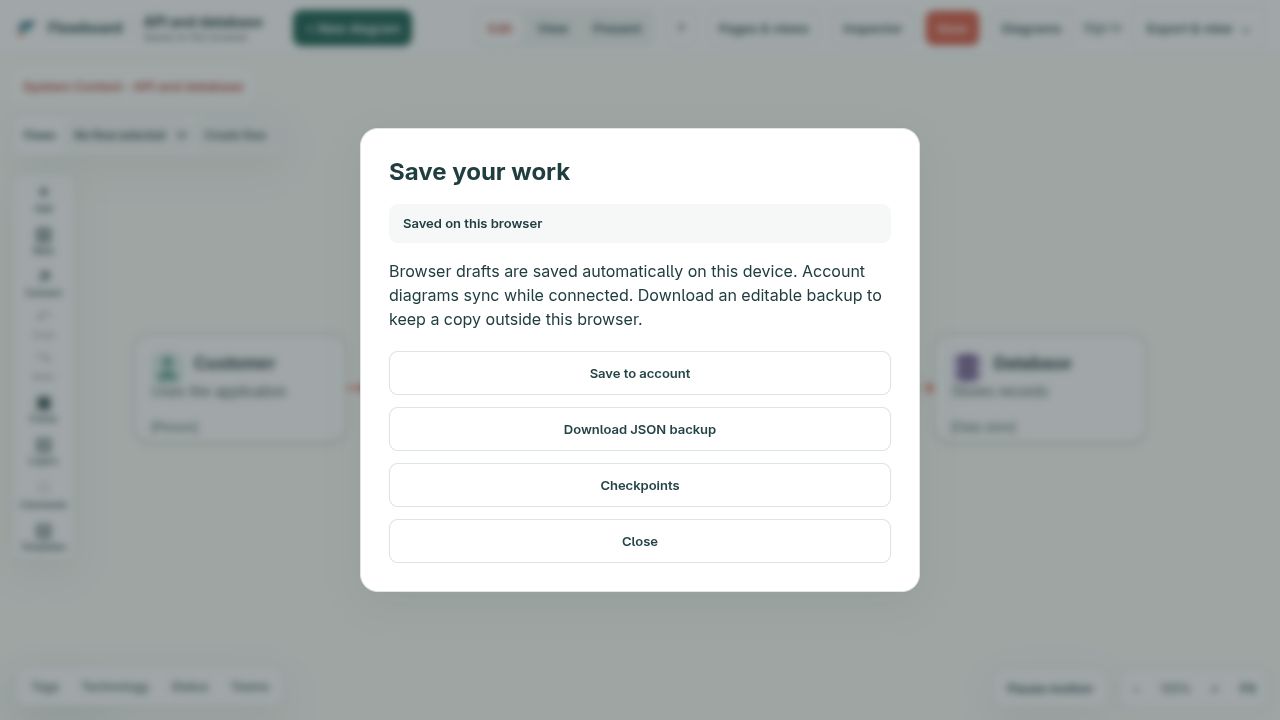
Local drafts autosave in this browser. Choose Save for Download JSON backup, Checkpoints, or Save to account. Sign in and save under the intended owner through Diagrams. Account diagrams are private by default; writable account diagrams sync subsequent edits. Wait for All changes synced. Save → Checkpoints offers named recovery points and reviewed restoration. Local checkpoints remain in this browser.
Diagrams → On this browser lists your named local drafts with Open and Download JSON actions. New diagrams and imports keep earlier drafts. Open another draft before choosing Move to Recently deleted; Restore brings it back. Clearing browser data removes local drafts and deleted copies, so keep external backups.
Only one tab edits a local draft at a time. Other tabs are read-only. Close the editing tab and choose Reload latest and enable editing, or Create separate copy to work independently. Browser editing requires Web Locks support over HTTPS or localhost.
Personal diagrams cannot share by user or company slug. Create a Team workspace from your profile when you need organization ownership, collaborative editing and managed member roles. Diagrams lists diagrams you own and diagrams shared with your email.
09 / Review
Company commenters, editors, and admins can discuss the diagram or anchor comments to nodes.
Authorized editors synchronize changes automatically. Independent edits merge; conflicting fields require review. Offline drafts remain recoverable. A checkpoint records an intentional checkpoint, and restore preserves a recovery checkpoint before changing the shared board.
10 / REST API
Trusted mutations use Authorization: Bearer or X-API-Key. Browser operations use the signed-in session. Discover routes at GET /api.
curl -X POST https://flowboard.studio/api/diagrams \
  -H "Authorization: Bearer $FLOWBOARD_API_KEY" \
  -H "Content-Type: application/yaml" \
--data-binary @architecture.yaml| Route | Purpose |
|---|---|
GET /api | Discover the complete API surface. |
GET /api/shapes | Search and paginate exact core, AWS, and Google Cloud shape types. |
GET|POST /api/diagrams | List accessible diagrams or create from Markdown, JSON, or YAML. |
GET|PUT|DELETE /api/diagrams/{id} | Read, replace, or delete a diagram. |
GET /api/diagrams/{id}/{markdown|yaml} | Read a portable text representation. |
GET|POST /api/diagrams/{id}/comments | List or add diagram/node comments; comment routes resolve or reopen them. |
GET /api/diagrams/{id}/events | Stream company collaboration events; POST to /presence updates cursor/view presence. |
GET|PUT /api/diagrams/{id}/access | Read or update sharing. |
GET|POST /api/diagrams/{id}/validate | Validate a saved diagram; POST /api/validate checks an unsaved document. |
GET /api/me | Read the signed-in account; /api/keys manages personal agent keys. |
Send X-Flowboard-Organization: organization-slug when the organization should own a newly created diagram. Company workspace, SSO, SCIM, sharing-policy, audit, and retention routes are documented in the sections below and returned by GET /api.
11 / MCP
The Streamable HTTP endpoint is https://flowboard.studio/mcp. Any active personal or company user can create a key on the MCP setup page; it is displayed once. The public list_shapes tool lets agents discover every core, AWS, and Google Cloud shape before drawing instead of guessing type names. An agent can build or update a diagram from your written instructions and environment evidence. In the other direction, it can read a diagram you drew to understand the system, answer questions about it, validate it, or use the visual model as instructions.
{
  "mcpServers": {
    "flowboard": {
      "url": "https://flowboard.studio/mcp",
      "headers": {"Authorization": "Bearer ${env:FLOWBOARD_API_KEY}"}
    }
  }
        }
Agent workflow: call list_shapes to resolve exact node types and list_diagrams to find the target, create at most one board if needed, then keep its ID. Use patch_diagram for small atomic changes and update_diagram for deliberate full round trips. Call validate_diagram, apply its exact suggested layout fixes, and rerun it until clean before declaring success. Every tool returns parseable JSON; mutations include the canonical URL, full normalized model, counts, computed parent bounds, and validation findings.
Layout feedback: overlapping siblings and children outside their containers include exact coordinates and a patch_diagram-compatible suggested_fix, so agents can correct placement without asking a person to nudge shapes.
Agent feedback: MCP asks agents to proactively save actionable observations, workarounds, and improvement ideas with submit_agent_feedback. Reports include an optional diagram reference and its revision timestamp. Use list_agent_feedback to review your account’s reports; the server-wide agent credential can review all reports. These explicit summaries are stored separately from diagrams and are not published with them. Agents must follow the guidance to submit feedback; MCP cannot collect their internal reasoning. Failed authenticated MCP tool calls are logged automatically, including invalid arguments and diagram validation failures. list_agent_errors shows recent failures and the 50 most frequent error patterns grouped by tool and format. Feedback and automatic error reports are stamped by the server with the running release version, commit SHA, and dirty-build flag. Reviews default to the current build; pass build="*" to review all builds, an exact build ID to inspect a release, or build="unknown" for older unversioned records. Error counts are grouped separately by build. These counts measure failed calls, including retries, rather than unique incidents. Raw submitted documents and request headers are not stored. Successful calls and their validation warnings are not counted as submission errors.
Tool set: list_shapes, create_diagram, list_diagrams, get_diagram, update_diagram, patch_diagram, validate_diagram, and delete_diagram. Shape discovery and accessible public diagram reads do not require a key; mutations and private data do.
12 / Business workspaces
Organization-owned diagrams remain with the business when employees change roles. Stable /orgs/{slug} and /users/{slug} identities support durable sharing.
| Role | Responsibility |
|---|---|
| Owner | Full workspace, identity, membership, sharing-policy, and governance control. |
| Admin | Manage members, sharing policy, SSO, SCIM, audit, and retention. |
| Editor | Create and update company diagrams. |
| Commenter | Review company architecture without editing the model. |
| Viewer | Read authorized company diagrams. |
Central identity reduces orphaned access. Organization ownership preserves institutional knowledge. Roles protect production architecture. SCIM automates joiner and leaver workflows. Audit and retention help security teams answer who changed what, when, and how long records remain.
Owners and admins manage sharing policy from Profile or GET|PUT /api/organizations/{slug}/sharing-policy. They choose the default visibility and whether new diagrams start shared with company members. Members may override those defaults unless the admin disables public links, email sharing, or company-slug sharing; blocked choices are enforced for browser, REST, and MCP requests.
Company-owned diagrams may share with exact company slugs. Personal diagrams never accept slug-based sharing.
13 / SAML SSO
The SAML 2.0 integration has local Keycloak test evidence. Compatibility with other providers requires its own acceptance run. Organization owners and admins can configure optional SSO through the governance panel or organization API when available on their deployment.
Login URL: https://flowboard.studio/auth/saml/acme
ACS URL:   https://flowboard.studio/auth/saml/acme/acs
Metadata: https://flowboard.studio/auth/saml/acme/metadataRead GET /api/organizations/acme/sso first. Copy its exact updated_at into the request below, including the initial zero timestamp. A stale save returns 409; keep your entries, reload and reconcile. Supply the public signing certificate only, never a private key.
curl -X PUT https://flowboard.studio/api/organizations/acme/sso \
  -H "Content-Type: application/json" \
  -b flowboard_session=... \
  --data '{
    "enabled": true,
    "require_sso": false,
    "updated_at": "COPY_EXACT_TIMESTAMP_FROM_GET",
    "domains": ["example.com"],
    "entity_id": "https://idp.example.com/metadata",
    "sso_url": "https://idp.example.com/sso",
    "certificate": "-----BEGIN CERTIFICATE-----\n...\n-----END CERTIFICATE-----"
}'curl -X POST https://flowboard.studio/api/organizations/acme/sso/test \
-b flowboard_session=...This endpoint checks saved configuration only and reports ready: false. It does not contact the provider or prove successful authentication. Test actual representative logins, role removal, provisioning and recovery separately.
Keep mandatory SSO off until domain ownership controls and a tested recovery path are available. A successful configuration check or one login is insufficient. The optional-SSO form does not enable enforcement and locks editing of an already-enforced policy; contact the deployment operator for its documented recovery procedure.
14 / SCIM
SCIM lets the identity provider create, update, list, and deactivate Flowboard users and groups. Create a one-time token and use the organization-specific base URL.
# Create a token as an organization owner or admin
POST https://flowboard.studio/api/organizations/acme/scim-token

# Configure the identity provider
Base URL: https://flowboard.studio/api/scim/v2/acme
Bearer token: fsc_...  # displayed once

GET|POST /Users
GET|POST /Groups
Use SCIM for lifecycle management and SAML for authentication. Together the identity provider controls who has an account and how they sign in.
15 / Governance
Audit records cover diagram, sharing, comment, identity, membership, administration, SSO, SCIM, and retention actions. Admins filter by action, target type, RFC 3339 date range, and limit, or export CSV.
GET /api/organizations/acme/audit?action=sharing.updated&from=2026-01-01T00:00:00Z
GET /api/organizations/acme/audit?format=csv
Retention windows are days. Zero retains the resource indefinitely. Enforcement never removes the current revision of a retained diagram.
PUT /api/organizations/acme/retention
{"diagram_days":365,"revision_days":180,"comment_days":90}

POST /api/organizations/acme/retention/enforce
16 / Troubleshooting
IDs start with a letter, use letters, numbers, hyphens, and underscores, are at most 64 characters, and must be unique.
Any shape can contain any other shape. Resize the parent, use the editor's layout action, or send an auto_layout patch operation; validate_diagram reports the exact IDs.
Confirm from and to exactly match different existing node IDs and that speed, direction, and color are valid. Use lanes or side hints for parallel routes.
Sign in with a free personal account or your company SSO account. Disabled accounts can still draft and export locally.
Check the slug, public base URL, entity ID, SSO URL, certificate, email domain, and ACS URL. Keep enforcement off until a real login succeeds.