System map
Clouds, regions, users, and the important data paths.
 flowboard
Architecture for platform engineers
Draw the services behind a request, connect the data path, and open a system to see its detail. People and agents work with the same portable Markdown, JSON and YAML model.
Use the desktop editor or connect your LLM through MCP. No account or card is needed for local desktop editing. Your existing draft stays yours.

Go with the data flow
Follow a request from the customer to the database. Open the system, explore the services, and make the model your own.
Open this example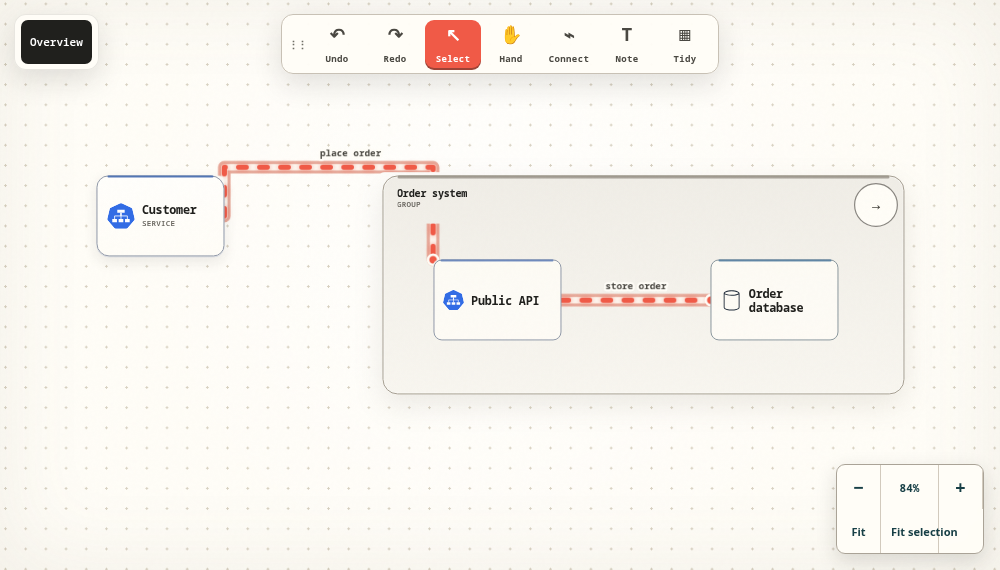
Open the system boundary and trace the place order and store order paths.
Open interactive exampleThe interactive example opens in the full desktop editor. The image and readable source work without JavaScript.
One system, every altitude
Show the whole platform for leadership, then open a cloud, cluster, or stream to work at service level. Breadcrumbs keep the audience oriented as the diagram gets deeper.
Clouds, regions, users, and the important data paths.
Clusters, registries, gateways, databases, and streams.
Pods, topics, services, notes, and the exact direction of flow.
Built for architecture work
The diagram gives visual thinkers, text-first collaborators and AI agents a shared structure they can inspect and edit after the meeting.
Give an agent your environment, code, or written instructions and have it produce an editable visual model.
Sketch the architecture visually and let an agent interpret the exact structure, flows, notes, and levels you created.
Move between the visual editor and portable Markdown, JSON, or YAML without flattening the diagram into an image.
Keep diagrams private, share by email address, or publish a public link. Company plans add managed workspace sharing and policy controls.
A request has a story
An accepted order might still need to cross a topic and reach a worker. Put that asynchronous boundary in the diagram, label what moves through it and give the next engineer a path to follow.
Use notes to explain the assumptions that a line cannot: retries, duplicate delivery, ownership and what happens when a dependency is unavailable.
Explore the event-driven workflow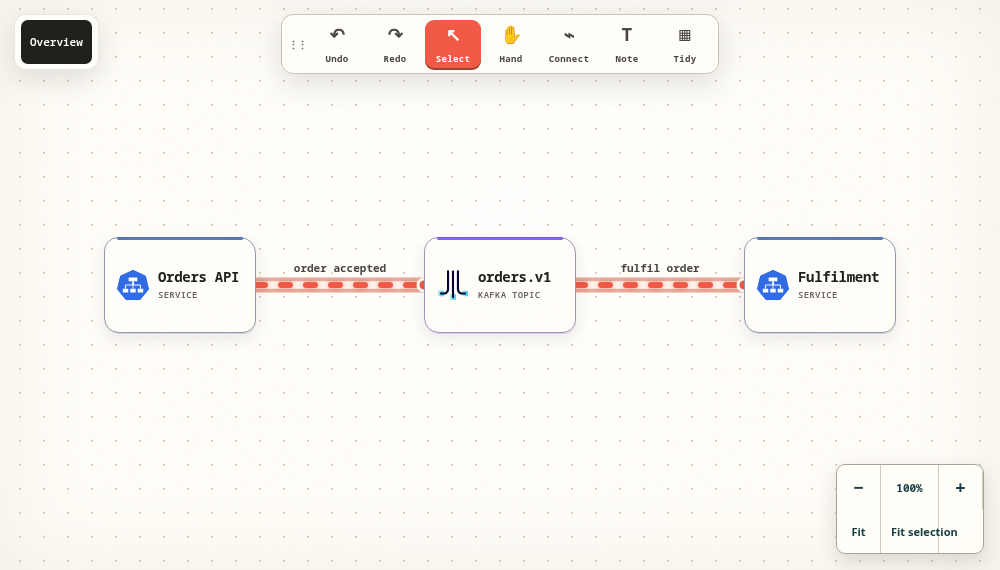
A practical handoff
Export the model you drew and ask an agent to explain the request path. Or start with a written description, create the model through MCP and inspect it in the editor.
Stable identifiers preserve the relationships when a label changes. Use a focused patch for small updates, validate the result and keep the source with the architecture discussion.
Bring your own compatible agent. Its credentials inherit your permissions; Flowboard does not include a proprietary AI model.
FLOWBOARD MARKDOWN
# Order processing

- Orders API {#api type=service}
- orders.v1 {#orders type=topic}
- Fulfilment {#worker type=service}

## Flows
- api -> orders {#publish label="order accepted"}
- orders -> worker {#consume label="fulfil order"}From a blank canvas to a useful model
Start from a working example, rename a service and follow its connections. Local editing needs no account. Free Personal has no trial clock.