
Architecture in practice
Make a delivery path understandable
Follow a build to its registry and workload; open the cluster for the pod-level view.
For Kubernetes and cloud platform engineers
Work through a real model.
Open the example, follow its connections and make a change. Edits save in a separate browser draft. Your main draft remains unchanged.
Start from this example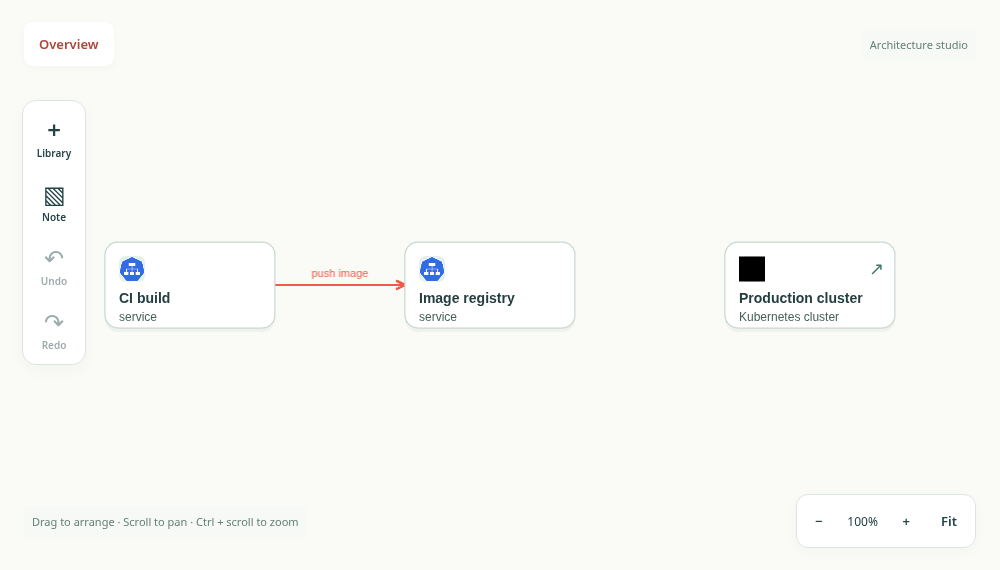
Separate delivery from runtime
The example follows a build artifact from CI into an image registry and then into a workload. Those connections describe image delivery. Add a separate user-request path when you want to explain runtime traffic, so a reader does not confuse deployment with application behaviour.
Use the cluster boundary deliberately
Open the cluster to inspect the pod inside it, then return to the delivery view. Add workload labels that your team recognizes. A namespace, cluster or region boundary should answer an ownership or failure-domain question, not just surround shapes.
Turn the starter into your diagram
Rename the registry and workload, document how a deployment is triggered and record the rollback assumption. The model is an explanatory artifact, not a Kubernetes manifest. Verify the architecture against your own deployment configuration.
Take the next step.
Use the task guide for the exact controls and permissions. Keep a portable export when you have made a change you want to preserve.
Read the task guideExplore another model