
Architecture in practice
Explain your architecture at the right level
Draw service boundaries, connect the request path, then open a system to inspect its detail.
For Platform engineers and architects
Work through a real model.
Open the example, follow its connections and make a change. Edits save in a separate browser draft. Your main draft remains unchanged.
Start from this example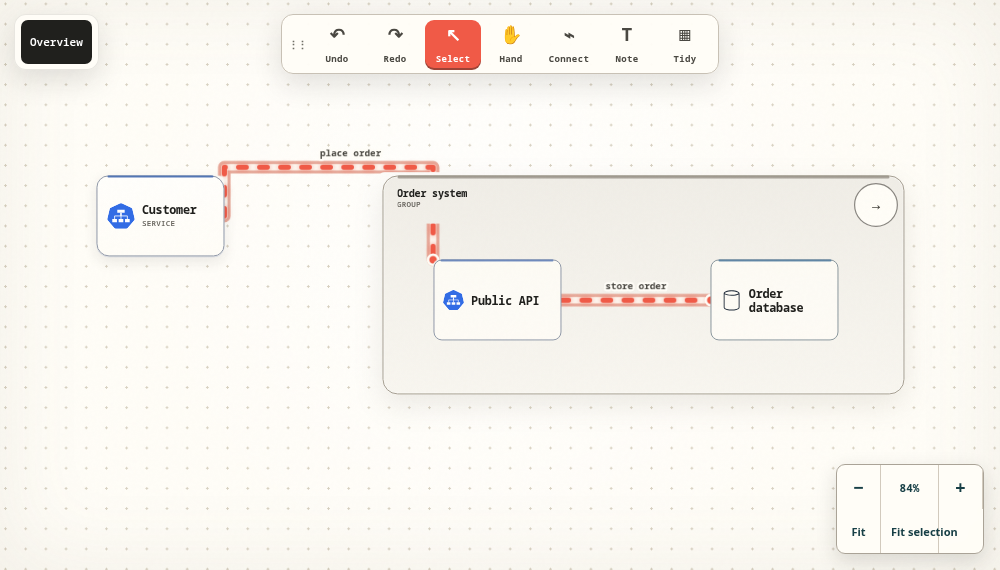
Choose the question before the shapes
Start with the person using the system, the boundary you own and the external services it depends on. Label connections with what they carry. A context view should let a reviewer explain the purpose of the system before they need to know how it is deployed.
Open the boundary when the detail matters
Keep an API and its database inside their system when that reflects your architecture. Open the system to discuss its internal path, then return with the breadcrumb. Moving a container moves its children, so the visual boundary remains useful while you rearrange the model.
Compose a view around the conversation
Containment describes where a node belongs. A composed view describes what you want to show together. Choose existing nodes across systems for a focused discussion without pretending that one system owns all of them. Multiple entry nodes can open the same view within a diagram.
Check the diagram with a reader
Ask someone to identify who initiates the request, which service handles it and where the data is stored. If the answer depends on a spoken explanation, improve the labels or notes. Export the source to keep an editable copy after the review.
Take the next step.
Use the task guide for the exact controls and permissions. Keep a portable export when you have made a change you want to preserve.
Read the task guideExplore another model