
Architecture in practice
Give a new engineer a system they can explore
Start with the customer and system boundary, then reveal the API and database without changing documents.
For Engineering leads onboarding teammates
Work through a real model.
Open the example, follow its connections and make a change. Edits save in a separate browser draft. Your main draft remains unchanged.
Start from this example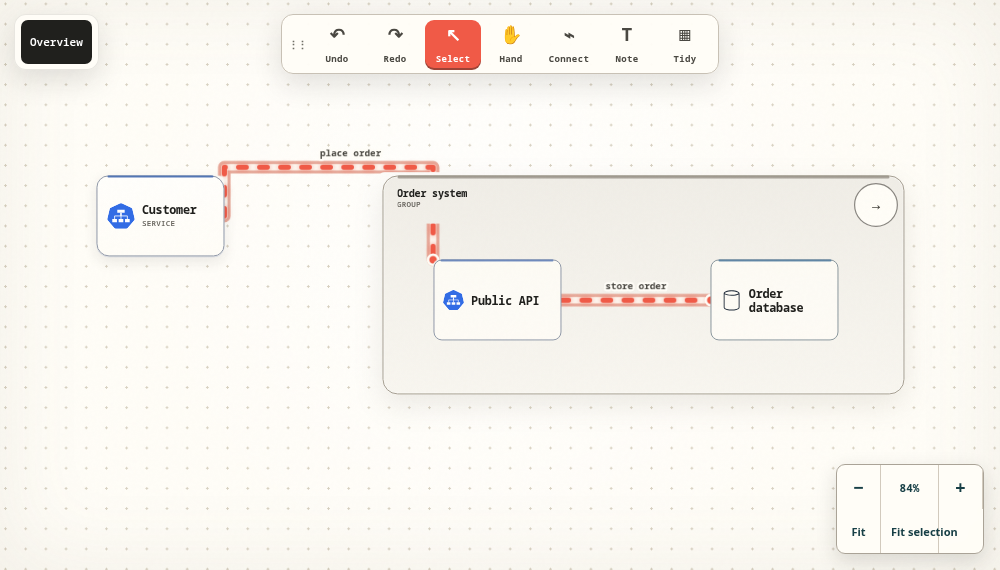
Begin with the user journey
Introduce the customer, the system boundary and the request that matters. The first conversation should establish what the system does before listing its internal services. Ask the new engineer to trace the entry point in their own words.
Reveal detail as questions appear
Open the order system to show the API and database. Explain why the write happens there and who owns that component. Add operational notes and links that answer the next practical question without filling the overview with every implementation detail.
Make understanding observable
Ask the engineer to change an unclear label, identify a dependency and explain where they would investigate a failed request. Keep their improvements in the model. A portable export gives the team an editable copy of what was discussed.
Take the next step.
Use the task guide for the exact controls and permissions. Keep a portable export when you have made a change you want to preserve.
Read the task guideExplore another model